



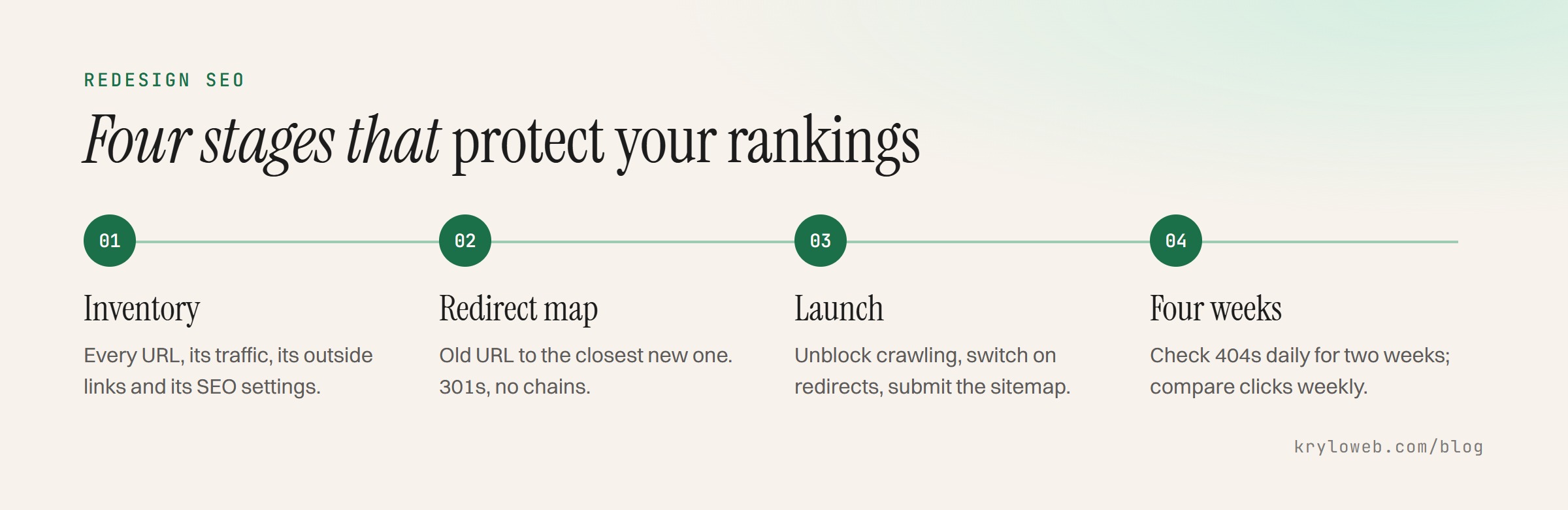
A website redesign SEO checklist comes down to four stages: record what ranks before you change anything, map every old URL to a new one, check the new site before launch, and watch it closely for four weeks after. Redesigns lose rankings for predictable reasons: pages move without redirects, content that ranked is cut, and settings from the staging site reach the live one. Each step below prevents one of those.
Why you need a website redesign SEO checklist
Search engines rank pages, not websites. When a page’s address changes, the new address starts with none of the old page’s history unless a permanent redirect tells search engines where it went. When a page’s content changes heavily, it may stop matching the searches it ranked for.
The common causes:
- Missing redirects. Old URLs return “page not found”, and links from other sites point nowhere.
- Cut content. A page that brought steady traffic is merged or removed.
- Staging settings left on. The new site launches with “noindex” or a robots.txt that blocks everything.
- Lost titles and descriptions. Carefully written titles are replaced with defaults.
- Slower pages. A heavier design makes pages slower, especially on phones.
- Changed internal links. Important pages get fewer links from the rest of the site.
Before: take an inventory
Do this before design starts.
- Export every URL on the current site. Use the sitemap, a crawler such as Screaming Frog (free up to 500 URLs), or your CMS.
- Export search performance. In Search Console, go to Performance, set the date range to 12 months, and export pages with clicks and impressions.
- Export the top search queries for your most important pages.
- List pages with links from other sites. Search Console’s Links report shows the top linked pages.
- Note pages that bring enquiries or sales from your analytics.
- Record titles, meta descriptions and H1s for every page that gets traffic.
- Save structured data (the JSON-LD on each page type).
- Test current speed in PageSpeed Insights for the homepage and key pages, so you can compare later.
- Back up the whole site, files and database.
Mark each URL in your inventory as keep, merge, improve or remove. Pages with search traffic or outside links should never simply disappear.
During: build the redirect map
A redirect map is a two-column list: old URL and new URL. Every old URL that changes or disappears needs a row.
| Old URL | New URL | Reason | Checked |
|---|---|---|---|
| /services/web-design.html | /web-design | New structure | Yes |
| /our-team | /about | Pages merged | Yes |
| /blog/2021/05/speed-tips | /blog/speed-tips/ | Date removed from blog URLs | Yes |
| /old-offer | /services | Service discontinued, closest match | Yes |
Copy the table into a spreadsheet with one row per URL. Rules for filling it in:
- Redirect to the closest match, not to the homepage. A visitor looking for a service page should land on that service or its replacement.
- Use permanent (301) redirects, not temporary (302) ones.
- Avoid chains. If A already redirects to B and B now moves to C, point A straight to C.
- Keep URLs that don’t need to change. The safest redirect is the one you don’t need.
- Include old images and PDFs that get traffic or links.
Then on the staging site:
- Titles, descriptions and H1s carried across or improved for every kept page
- Structured data present and valid in Google’s Rich Results Test
- Canonical tags point to the live domain, not staging
- Internal links point to new URLs directly, not through redirects
- Images have alt text
- Pages pass a speed test at least as well as the old site
- Staging is blocked from search engines (and you have a note to unblock it)
Launch day
- Remove the staging “noindex” and check robots.txt allows crawling
- Put the redirects live and test a sample from the map, including old links from other sites
- Crawl the new site for broken links and redirect chains
- Submit the new XML sitemap in Search Console
- Check that analytics and conversion tracking record visits and form submissions
- Test the contact form, checkout or booking flow yourself
- Keep the old site’s backup and the redirect map somewhere safe
The first four weeks
- Daily for two weeks: check Search Console’s Pages report for spikes in “Not found (404)” errors and fix them with redirects
- Weekly: compare clicks and impressions with the same period before launch
- Check key queries for your most important pages
- Review Core Web Vitals once field data catches up, after about four weeks
- Update links you control: social profiles, directory listings, email signatures
Some movement in the first weeks is normal while search engines process the redirects. A steady drop on specific pages after two or three weeks usually points to a missing redirect or content that changed too much.
When to get help
A small site with a handful of URL changes can be handled with this list. A site with hundreds of pages, a platform change or a store with product URLs is where mistakes get expensive. Our website redesign service includes the inventory, the redirect map and the post-launch checks, and our SEO services cover audits on sites that already lost traffic.
For the budget side, see website redesign cost. If the redesign includes moving platforms or domains, read the website migration checklist as well.