



In the Astro vs WordPress choice, pick Astro when your site changes a few times a month, speed and security matter most, and a developer will make most changes. Pick WordPress when several people publish often, you need an editor anyone can use, or you depend on plugins for things like events, memberships or forms. Both can be fast. On our own domain, an Astro page and a WordPress page we built both score 100 on Lighthouse’s desktop test, and 90 and 93 on mobile.
We are in an unusual position to compare them. The main kryloweb.com site is built with Astro. The blog you are reading runs on WordPress with a block theme we wrote. Same team, same fonts, same hosting, same domain.
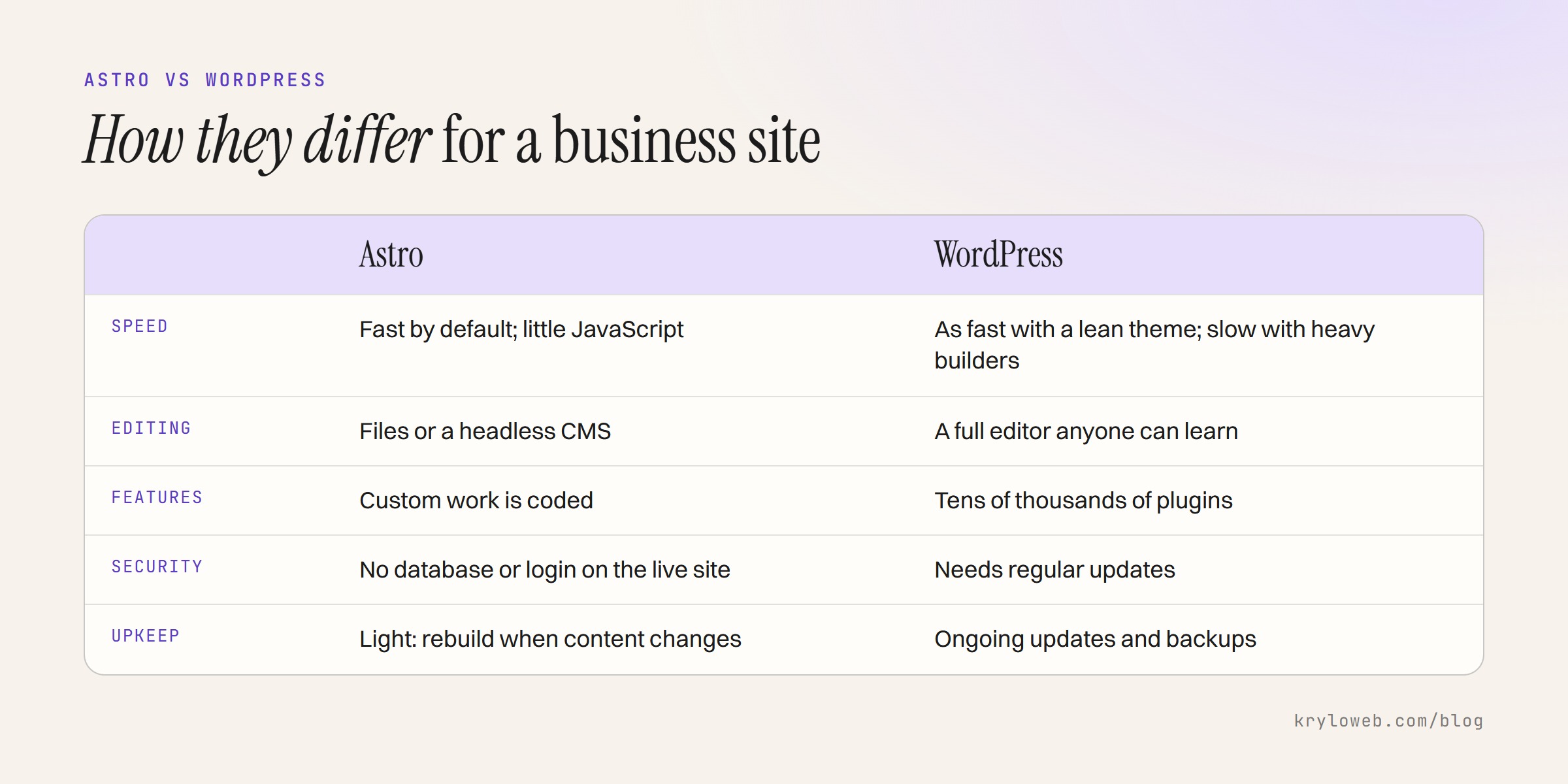
Astro vs WordPress: the short comparison
| Astro | WordPress | |
|---|---|---|
| What it is | A framework that builds pages into plain HTML files ahead of time | A content management system that builds pages from a database when visited, usually with caching |
| Speed | Fast by default: little or no JavaScript is sent unless a page needs it | Can be just as fast with a lean theme; often slow with heavy page builders and many plugins |
| Editing | Content in files or a separate CMS; usually needs a developer or a headless CMS for non-technical editors | A full editor in the browser that anyone can learn |
| Plugins | Fewer ready-made features; custom work is coded | Tens of thousands of plugins |
| Security | Very little to attack on a static site: no database or login page on the live server | Needs regular updates to core, theme and plugins; login pages are a common target |
| Hosting | Any static host, often cheap or free | PHP and a database; managed WordPress hosting is common |
| Maintenance | Light: rebuild and redeploy when content changes | Ongoing updates and backups |
What our measurements show
We tested both on 10 October 2026 with Lighthouse 12, using Google’s mobile and desktop settings.

| Page | Platform | Mobile score | Mobile LCP | Desktop score | Requests | Page weight |
|---|---|---|---|---|---|---|
| /services | Astro | 90 | 2.9 s | 100 | 18 | 274 KB |
| /blog/ | WordPress, our block theme | 93 | 2.9 s | 100 | 22 | 233 KB |
The WordPress page did slightly better on mobile. That surprises people who expect a static site to win easily, but it shows the real lesson: how a site is built matters more than which platform it is built on. Our WordPress theme uses the same approach as the Astro site: no page builder, a few small files, fonts loaded from our own server, and no plugins that add scripts to every page.
The Astro homepage is a different story because it runs a 3D scene, and that costs time on slow phones. We wrote about that in how to improve Core Web Vitals.
Where the platforms really differ is the floor, not the ceiling. An Astro site starts fast and has to be made slow. A WordPress site with a popular multipurpose theme, a page builder and twenty plugins often starts slow and has to be made fast. If you can’t control how the WordPress site is built, Astro is the safer bet for speed.
Editing: who changes what
This is usually the deciding factor, and it should be.
On WordPress, you log in and edit. Writers, marketers and owners can publish posts, change pages and upload images without a developer. That is why our blog runs on it: we publish often, and the editor makes that easy.
On Astro, content usually lives in files in the code, or in a separate headless CMS that the site reads when it is built. With files, a developer makes most changes. With a headless CMS, editors get a web form to edit content, but the setup costs more and the preview is less direct than WordPress. We explain the trade-offs in headless CMS explained.
Our main Astro site changes a few times a month, and a developer makes those changes. That suits it.
Security and maintenance
A static Astro site has no database or admin login on the live server, so there is very little to break into. Maintenance means updating the code’s dependencies now and then and rebuilding.
WordPress needs regular updates to the core software, the theme and every plugin, plus backups before each update. Skipped updates are the most common way WordPress sites get compromised. This is manageable, and it is what website management plans cover, but it is a recurring cost.
Cost over three years
The build costs about the same on either platform for a site of the same size; our prices are on the pricing page. The difference is afterwards:
- Astro: cheap static hosting, light maintenance, and developer time for content changes unless you add a headless CMS.
- WordPress: PHP hosting, regular updates (yourself or through a management plan), and possibly paid plugins with yearly licences. Content changes are free if you make them yourself.
If you edit weekly, WordPress usually costs less over three years. If you rarely edit, Astro usually does.
Moving from WordPress to Astro
If you move, your search rankings move with you only if the pages do. Keep URLs the same where you can, redirect every one that changes, and carry across titles, descriptions and structured data. Our website redesign SEO checklist covers the full process.
When WordPress is the better choice
- Several people publish every week
- You need plugins that would be expensive to build, such as event booking, memberships or learning management
- You want to change any page yourself without asking anyone
- You already have a fast, well-built WordPress site; rebuilding it on Astro would cost money for little gain
When Astro is the better choice
- The site is mostly service pages that change a few times a month
- Speed and security are priorities and you don’t want to manage plugin updates
- The design needs custom interaction or animation that a theme would fight
- Hosting should be simple and cheap
Questions people ask
Is Astro better for SEO than WordPress? Not by itself. Search engines care about content, speed and structure. Astro makes speed easier; WordPress with a good theme and Rank Math or Yoast handles the rest just as well.
Can I use WordPress with Astro? Yes. WordPress can be the headless CMS that editors use, with Astro building the public pages.
Does Astro have an editor? Not built in. You add a headless CMS if non-developers need to edit.
We build on both. See Astro website development and WordPress development for how we use each.
Sources
- KRYLOweb’s own Lighthouse 12 measurements of kryloweb.com/services and kryloweb.com/blog/, 10 October 2026, mobile and desktop presets.